
Stock Screener
FinanceptFinance
4.2747.00 Reviews
- Version
- 2.29
- Installs
- 100.00K
- Age Rating
- Everyone
Screenshots
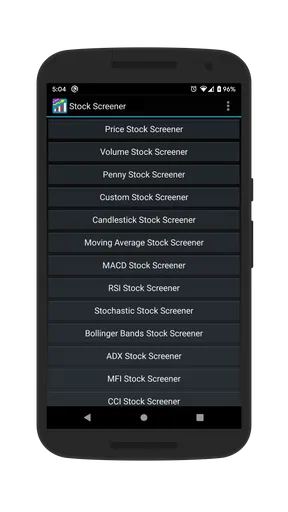
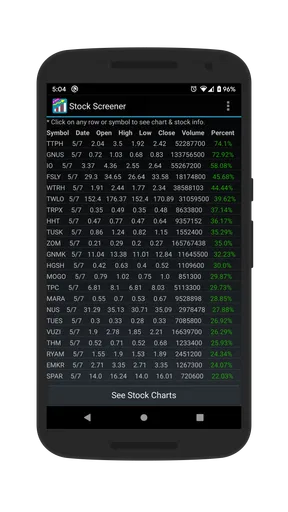
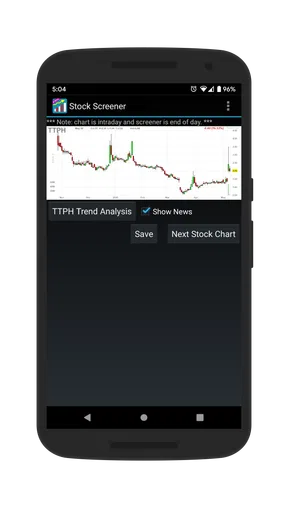
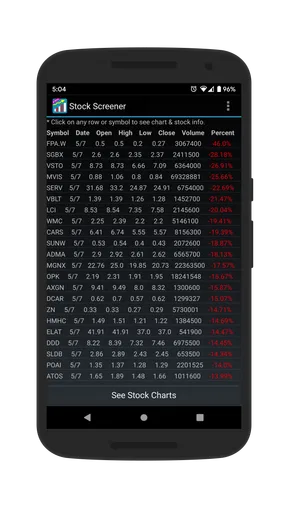
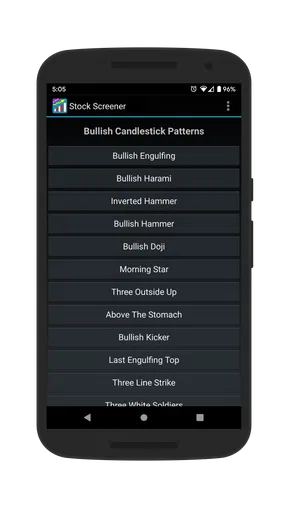
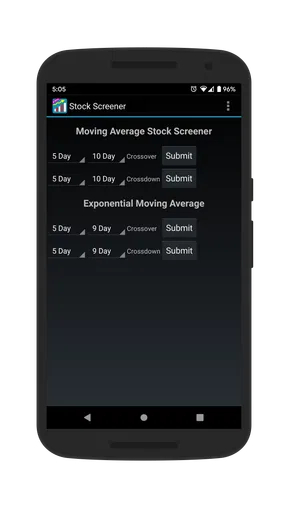
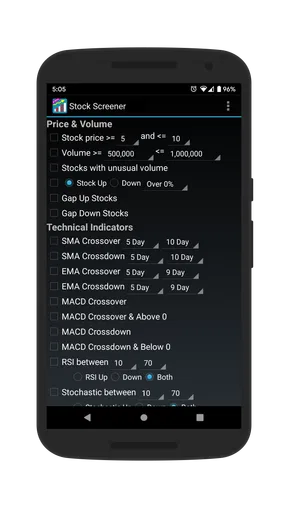
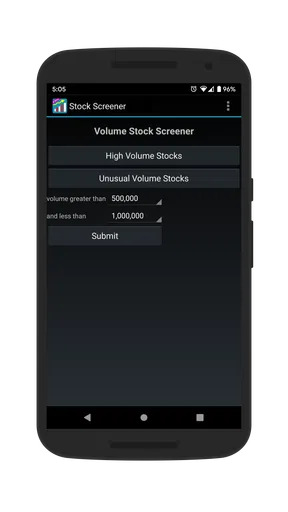
Our Review of Stock Screener
 Analysis by Appyee
I found Stock Screener most useful when I wanted to narrow a long list of US shares before doing deeper research elsewhere. It is a finance app from Financept, built around technical analysis rather than news, company storytelling, or portfolio decoration. In everyday use, that focus makes it feel more like a practical filtering tool than a complete investing companion. I can enter a screening idea, inspect the results, and decide which companies deserve a closer look without scrolling through an enormous market list.
The app is free to install and is suitable for Everyone, which makes it approachable for a beginner who wants to understand how stock filters work. Its current version is 2.29, and it runs on Android devices using 6.0 or later. The public response is encouraging rather than flawless: it holds a 4.2 average from around 2.7 thousand ratings, with more than 100 thousand installs. Those figures suggest a real user base, but they do not turn the app into a substitute for checking filings, business fundamentals, risk, or your broker’s order screen.
How Stock Screener feels when the network matters
The experience is closely tied to the quality of the connection because the app’s purpose depends on current market information and technical calculations. When I use it with a stable connection, the main benefit is speed of thought: I can move from a broad market question to a smaller watchlist without manually opening one symbol after another. That is especially handy during a short break, when I want to identify candidates rather than conduct a full investment review.
A weak connection changes the character of the app. A screen that relies on refreshed market information can take longer to become useful, and a delayed result is not something I would casually treat as a live trading signal. This is an important distinction: a screener can help organize attention, but the moment of calculation and the freshness of the underlying information matter. I therefore use the results as a starting point, not as an instruction to buy or sell immediately.
My preferred workflow is to decide what I am looking for before opening the app. For example, I might be interested in shares showing a particular technical pattern or momentum condition. I then apply a narrow set of filters, review the shortened list, and write down the symbols that merit further checking. This avoids repeatedly loading broad searches and makes the app feel less dependent on constant back-and-forth browsing.
One subtle strength is that filtering changes the question I ask. Instead of wondering which stock is “good,” I can ask which US stocks currently match a defined technical condition. That is a healthier use of a screening tool because it keeps the app in its proper role. The result is a research queue, not a verdict on a company.
What the technical focus does well
Technical analysis is the center of the experience, and that gives Stock Screener a clear identity. I can use it when price behavior, trend direction, or other chart-based conditions are more relevant to the first stage of my research. The app is particularly suitable for someone who already understands why a filter matters and wants a quicker way to find matching symbols.
For a newer investor, the same focus can be confusing. A result may look attractive because it matches a technical rule, while the underlying business may have debt, weak cash flow, an expensive valuation, or a serious event that the filter does not capture. I would never let a technical match become my entire research process. After screening, I check the company independently and consider whether the pattern fits my time horizon and risk tolerance.
A useful advanced habit is to run the same idea with slightly different settings instead of trusting one rigid search. If a result disappears after a small adjustment, that tells me the shortlist is sensitive to the chosen condition. If several related searches produce overlapping names, I gain more confidence that the list is not simply an artifact of one narrow filter. This does not make the result accurate by itself, but it helps me recognize how fragile a screen may be.
Using it during ordinary mobile moments
Stock Screener makes the most sense on a phone when I have a specific task. A realistic example is checking the market during a commute or lunch break after noticing that a sector has become unusually active. I can use the app to reduce the number of US shares I need to investigate later, save the names mentally or in my normal notes, and postpone the serious decision until I have time for company research.
That mobile role is different from sitting at a desktop with several charts, financial statements, and news windows open. The phone is excellent for triage, but less comfortable for comparing many candidates at once. Small-screen navigation also encourages quick conclusions, so I try to pause after seeing a promising result. The most useful question is not “Should I buy this?” but “What should I verify next?”
I would recommend keeping the search simple on a phone. Start with one clear technical idea, inspect the output, and only then add another condition. Building an elaborate screen on a small display can make it difficult to remember which rule removed a stock. A staged approach gives me a better sense of how each filter affects the list and reduces the chance of excluding a candidate accidentally.
There is also a practical connectivity trade-off in mobile use. A stable Wi-Fi or strong mobile-data connection makes repeated exploration more comfortable, while an inconsistent signal rewards preparation. I decide the screening question first, avoid unnecessary refreshes, and treat any result that appears during a visibly unstable session as something to revisit later. I would not plan an urgent trade around a screen produced under uncertain connectivity.
What happens when a session goes wrong
The most important recovery skill is knowing when to stop interpreting the screen. If results are slow, incomplete, or appear not to refresh, I do not assume that a blank or unchanged list means the market has no matches. I leave the search, check the connection, and try again later rather than forcing a conclusion from a questionable display.
For repeatable research, I keep a plain record of the filters I used and the time I ran them. That small habit is more valuable than it sounds. If the app behaves differently in a later session, I can tell whether the change came from the market, from a changed filter, or from a connectivity problem. It also prevents me from remembering a shortlist as if it were a permanent recommendation.
When the app becomes inconvenient, my fallback is not another random stock app. I move to a broader research source for company information, then return to Stock Screener when I need to test a technical idea again. This division of labor works better than expecting one mobile tool to provide screening, financial analysis, news, portfolio management, and execution equally well.
The app’s free entry point helps with this trial-and-recovery process because I can evaluate whether its screening style fits my routine before committing money. There are in-app purchases priced from $2.79 to $9.99 per item, so I would first confirm that the basic workflow solves a real problem for me. Paying for an extra convenience is easier to justify after I know exactly which part of the process is slowing me down.
Being careful with data and attention
Even without treating the app as a heavy daily dashboard, repeated searches can use more connection time than a single focused session. I prefer to group research into short visits: define the idea, run the screen, note the candidates, and close the app. This is better for my attention as well as for mobile data because it prevents endless refreshing and speculative browsing.
A data-conscious workflow also means avoiding unnecessary broad scans. If I already know the market area or technical concept I want to investigate, I begin there instead of repeatedly searching everything. Narrowing the task makes the results easier to understand and reduces the temptation to keep changing filters until something looks exciting.
I would be cautious about interpreting any screen as real-time enough for execution. The app is designed to filter stocks for technical analysis, but a filtered result still needs context: the timing of the information, the behavior of the individual security, and the conditions of the market. Before placing an order, I would verify the current quote and trade through a broker rather than assuming that a screener is an execution service.
This is also where Stock Screener compares favorably with a general finance app, but less favorably with a full desktop research platform. A general finance app may be better for news, account tracking, or a quick quote. A desktop platform may offer more room for chart comparison and deeper analysis. Stock Screener occupies a narrower middle ground: it is more purposeful than a simple quote app, while remaining more focused and less comprehensive than a full workstation.
Who should use it and who should look elsewhere
I think the app is a good fit for an investor who already has a technical question and wants a compact way to find US stocks that match it. It can also help a learner understand how changing screening conditions changes a candidate list. The free access makes experimentation approachable, and the mobile format suits people who want to prepare a research shortlist away from a desk.
I would skip it if my main need is long-term portfolio tracking, dividend planning, company financial analysis, breaking news, or direct trading. Those tasks require a different kind of tool. I would also avoid relying on it if I am completely new to investing and expect the app to explain why a stock is suitable. A screener can sort symbols according to chosen conditions; it cannot replace learning what those conditions mean.
Another trade-off concerns connectivity. Someone who regularly works with an unreliable signal may find the experience frustrating, particularly if they expect immediate market updates. The app is more comfortable for deliberate research sessions than for making decisions in a moving market under pressure. If my priority were dependable execution or a complete offline research library, I would choose a service built specifically around those needs rather than stretching this app beyond its purpose.
My verdict on the connected experience
Stock Screener earns its place as a focused finance utility because it helps turn a broad US stock universe into a manageable research list. I like it most when I use it deliberately: one technical idea, a controlled set of filters, a quick review, and independent verification afterward. That workflow makes the mobile format feel efficient instead of restrictive.
Its limitations are just as important. The results should not be mistaken for recommendations, technical matches can be sensitive to the chosen rules, and a weak connection can undermine confidence in a session. The app also does not replace the broader tools I use for business research, current quotes, portfolio decisions, or order execution.
Overall, I would recommend Stock Screener to a technically minded investor who wants a free way to narrow candidates and is comfortable doing the serious work after the screen. Financept has kept the product’s purpose clear, and the 4.2 average from its user base reflects a useful experience for many people. I would treat the optional purchases as something to consider only after testing the basic routine. Used with realistic expectations and a reliable connection, Stock Screener is best viewed as a research filter, not a financial adviser.
Verdict
Strengths of Stock Screener
- Filters stocks quickly by price, volume, market cap, and technical indicators.
- Supports faster research by narrowing large markets to relevant investment ideas.
- Useful for comparing companies across multiple financial and performance metrics.
- Can help identify potential breakouts, undervalued stocks, or unusual market activity.
- Simple screening tools are suitable for both beginners and experienced investors.
Limitations of Stock Screener
- Screening results depend on data accuracy and may not update instantly during market hours.
- It does not replace detailed company research or professional investment advice.
- Some advanced filters or features may require a paid subscription.
- Technical signals can produce false positives, especially in volatile markets.
- Coverage and available metrics may vary between exchanges and regions.
Similar Picks in This Category
View All
Google Wallet
Google LLC4.3

Airtel: Recharge, Bank & Loans
Airtel4.0

PayPal - Pay, Send, Save
PayPal Mobile4.2

DANA Indonesia Digital Wallet
PT Espay Debit Indonesia Koe4.5

Binance: Buy Bitcoin & Crypto
Binance Inc.4.8

Cash App
Block, Inc.4.7
Frequently Asked Questions
What is Stock Screener and what can I use it for?
Stock Screener is an investment research app designed to help you filter and analyze publicly traded companies using customizable criteria. You can search for stocks by price, market capitalization, dividend yield, earnings, valuation ratios, growth figures, technical indicators, and other financial data. It is useful for discovering potential investment ideas, comparing companies, and monitoring markets, but it should not be treated as a substitute for personal research or professional financial advice.
Does Stock Screener provide real-time stock prices and market data?
The app may provide current or delayed market information depending on the exchange, instrument, subscription level, and data provider. Before relying on a displayed price for a trade, check whether the quote is real-time, delayed, or updated periodically. Information such as company fundamentals, charts, analyst estimates, and financial statements can also have different update schedules, so users should verify important figures with an official brokerage or exchange source.
Can I create custom filters and save stock-screening strategies?
One of the app’s most useful features is the ability to narrow a large market universe with selected conditions. Depending on the version you install, you may be able to combine fundamental and technical filters, adjust numerical ranges, sort results, and save frequently used screens. This makes it easier to repeat a value, dividend, growth, momentum, or small-cap search without rebuilding the same criteria every time.
Is Stock Screener suitable for beginners, and does it include investment recommendations?
Stock Screener can be useful for beginners because it organizes complex market information into searchable categories, but new investors may need time to understand ratios, financial terminology, and technical indicators. Screening results are not guaranteed recommendations or predictions. A stock appearing in a filter does not automatically mean it is suitable for your goals, risk tolerance, or portfolio, so additional research is essential before investing.
Is Stock Screener free, and are there any limitations or privacy concerns?
The app may offer free access with limits on available markets, filters, historical data, saved screens, advertisements, or advanced features. Some tools may require a subscription or in-app purchase, so review the pricing and renewal terms before upgrading. Also check the permissions and privacy policy to understand what account, device, or usage information is collected, particularly if you create an account or synchronize watchlists across devices.
